With millions of users of the Pomodoro technique, as per its creator, Francesco Cirillo, it is one of the most popular time management and productivity strategies in the world today. Cirillo developed it in 1987, when he was a university student. The method uses a timer to mark 25 minutes of uninterrupted work (one “Pomodoro session”), followed by a five-minute break. Utilized by everyone from students to CEOs, it allows users to maintain a high level of focus throughout an entire day by alternating uniform periods of work and breaks.
However, if you are one of those millions, you might have encountered several challenges with the method, such as feeling the need to go beyond the allotted time or losing your momentum once the alarm sounds and being unable to regain it afterward. Zoë Read-Bivens certainly did, leading her to come up with her own technique: The Flowtime method (or, more humorously, “Flowmodoro”).
An improvement on Pomodoro, users still break up tasks such as studying into blocks of time. But instead of following a uniform length of time for all people across all kinds of tasks, each person gets to adjust it based on their own tasks and levels of concentration. Users of the Flowtime method claim that they gain the benefits of Pomodoro without its drawbacks.
In this article, we will go into detail on the differences between the Pomodoro and Flowtime Methods and how you can utilize the latter to bring your study sessions to another level.
Weaknesses of the Pomodoro technique
While the Pomodoro method can increase focus and productivity, its inflexibility has drawbacks. It tends to be effective for short-term or repetitive tasks, but it can hinder tasks that require sustained focus and attention for long periods.
- Inadequate time: The Pomodoro technique limits work to 25-minute blocks, which can be a disadvantage for complex tasks that need more time than that.
- Distractions: For tasks that cannot be completed within 25 minutes, the enforced breaks can be a distraction for some users and can lead to procrastination.
- Tiring: The five-minute breaks can be inadequate for refreshing students’ minds. Not all students are equal, and not all topics of study require the same amount of work, so a uniform schedule that suits some can be detrimental for others.
- Hinders reaching flow state: The “flow state” – a mental state in which an individual is completely absorbed in an activity – allows for maximum focus on a task. Frequently breaking up tasks can disrupt that focus and prevent us from reaching it.
What is the Flowtime Method?
The Flowtime Method is the result of Zoë Read-Bivens and her efforts to address the primary issues associated with Pomodoro. Rather than time-blocking each day’s tasks, this technique grants students and other users the ability to fully immerse themselves in what they are doing and then take breaks when it is natural for them to stop.
To make use of this time management method for studying, a student focuses on one task, such as the chapter of a book or an online course, and takes note of the time when they started working on it. Whenever the student is distracted or feels the need to stop, he or she takes a break, and the total length of time for that session should be recorded.
After some time, students can look at the lengths of their various sessions and determine an average time between all of them. This is the starting point in identifying how long it takes for them to reach their flow state.
Aside from the times students start and stop their study sessions, they should also take note of distractions. Once students identify common distractions, they can work on ways to eliminate or at least reduce their impact.
How to use the Flowtime study method
Following the Flowtime method is simple in principle, as it depends on finding the correct work structure for you and your studies or work, but can require some work until you find those parameters. To get started, just follow these steps:
Step 1: Decide what you will work on
The only hard rule of the Flowtime method is that you do one thing at a time (referred to as “unitasking”).
Step 2: Start working
Do not set a timer (when it goes off, you might otherwise get yanked out of your flow state), but keep working either for as long as the task requires or until you feel you need to take a break. However, make sure you track the start time, the end time, and any interruptions to your work (so that you can try to reduce interruptions in the future).
Step 3: Take a break
Decide how long you will take a break and set a timer for your break. If you don’t know what length of break is appropriate for you, don’t worry – you will learn over time what works for you.
Repeat the steps as necessary.
How should I take notes for the Flowtime method?
While Flowtime was first developed with pen and paper in mind, leveraging technology brings the technique to a whole new level with the ease, precision, and additional features apps bring. For example, apps are especially helpful when tracking improvements or comparing different versions of a task over time. Apps also allow for the inclusion of additional information like notes, files, images, and more. Additionally, apps are often easier to use than pen and paper when it comes to entering information and incorporating reminders.
Personally, I prefer a midpoint, using a simple spreadsheet on my computer, as it makes it tidier and easier to analyze your tracking data. Here is a suggested structure for a spreadsheet:
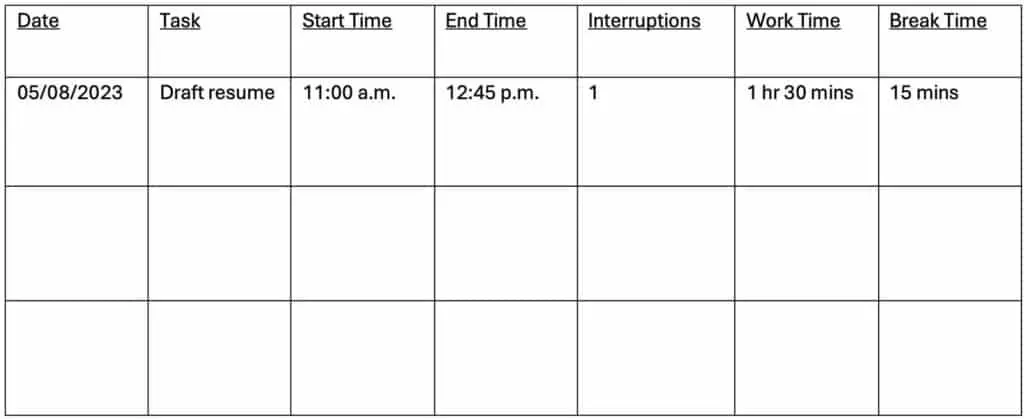
Change this spreadsheet as needed. You might, for example, want to classify your tasks by type or provide additional information about the interruptions.
How long should my break be?
Here is one of the great things about the Flowtime Method: Students determine how long they should take a break. As we explained earlier, the amount of time needed to reach the flow state differs from person to person.
In addition, the time needed to finish a task varies from activity to activity, subject to subject, and, of course, student to student. The best person to determine if one has sufficiently rested is the student itself.
For some guidance, here are some suggested break lengths:
- For 25 minutes of work or less: a five-minute break.
- For 25–50 minutes of work: an eight-minute break.
- For 50–90 minutes of work: a 10-minute break.
- For more than 90 minutes of work: a 15-minute break.
However, just use this as a starting point – you should really listen to your own needs and customize your breaks accordingly.
Is the Flowtime Method better than the Pomodoro technique?
The Flowtime method is a more flexible work strategy than the Pomodoro method.
While the Pomodoro method prescribes 25-minute intervals, Flowtime cycles vary per student and can range from 15 to 60 minutes depending on the individual’s emotional and physical state. This allows students to stay in their flow state instead of being cut off by a timer just as they are fully absorbed in their work.
Similar to Pomodoro, Flowtime sustains an individual’s productivity by allowing for short breaks between cycles. However, Flowtime breaks are handled differently. Rather than following a fixed schedule, breaks are taken when people naturally feel distracted, drained, or exhausted.
Last but not least, the Flowtime method is based on the natural ebb and flow of focus energy found in people. The Flowtime approach grants users the flexibility to make changes to their work strategy depending on their energy levels and frame of mind, whereas the Pomodoro method does not accommodate such individual-level adjustments. Instead, the Pomodoro method limits individuals to cycles of predetermined length that all users must adhere to, regardless of how they are feeling or what their energy requirements are.
That flexibility does not automatically make Flowtime more productive, though. In a 2023 study by Biwer and colleagues, 87 university students worked on their own study material for a two-hour session, taking either fixed breaks (a Pomodoro-style 6 minutes after every 24 minutes of study, or 3 minutes after every 12) or breaks whenever they chose, much as Flowtime suggests. Those who chose their own breaks studied in longer stretches and took longer breaks, but they reported more fatigue and distraction and less concentration and motivation. They also got no more done: all groups completed a similar share of their planned tasks.
If you use the Flowtime method, a few guardrails help. Decide how long your break will be before you take it and set a timer for it, as described in Step 3. Watch for breaks that keep getting postponed: if your notes show long sessions that only end when you are exhausted, take your breaks a little earlier. And keep an eye on the clock overall – without a timer, work can also expand to fill the time available, as Parkinson’s law puts it.
Conclusion
Many would benefit from using a method to break up their work into smaller chunks. However, depending on your priorities, your mileage may vary with different timer techniques. Whether or not you are already a Pomodoro user, I would recommend that, at a minimum, you try out the Flowtime method to see how the approach works for you – especially if you are in work that benefits from being in a flow state of mind.